

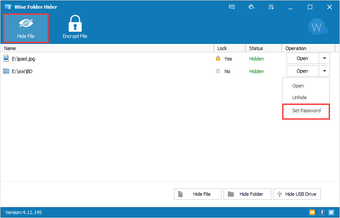
Description
Download Wise Folder Hider Pro – hide files, password protect, secure folder, Windows, privacy tool
Overview
Wise Folder Hider Pro is a dedicated security utility designed to help users protect sensitive files and folders on Windows-based systems. The app addresses the growing need for personal data privacy by offering a straightforward method to conceal digital content from unauthorized access. It is particularly useful for individuals who manage confidential documents, personal photos, financial records, or private correspondence on shared or public computers. The software enables users to safeguard their digital assets with minimal effort, making it ideal for home users, remote workers, and professionals handling sensitive information.
Developed by WiseCleaner, the application has been available since 2019 and maintains a focused purpose: secure file hiding through password protection and right-click integration. The developer did not provide additional technical details about the development methodology or security protocols used. However, the app’s core functionality centers on simplicity and accessibility, allowing users to hide files without launching the program each time. This design supports real-world use cases such as protecting private data on office computers, securing files on USB drives during travel, or maintaining privacy on family-shared devices.
Within the broader software ecosystem, Wise Folder Hider Pro fills a niche for lightweight, no-frills privacy tools. It does not aim to replace comprehensive encryption suites but instead provides a quick, user-friendly layer of protection for everyday file management. Its compatibility with multiple Windows versions ensures broad usability across older and modern systems.
Key Features & Functionality
- Password Protection: Files and folders can be secured with a user-defined password, ensuring access is restricted to authorized individuals only. This feature is essential for preventing accidental or intentional exposure of private data.
- Right-Click Hiding: The app integrates directly into the Windows context menu, allowing users to hide any file or folder with a single right-click. This eliminates the need to open the application, streamlining the privacy workflow.
- Local and Removable Drive Support: Users can hide content not only on internal drives but also on external devices such as USB flash drives and SD cards. This dual functionality is valuable for those who frequently transfer sensitive data between devices.
- Multi-Language Interface: With support for over 30 languages, the software is accessible to users worldwide, enhancing usability across diverse linguistic communities.
- Minimal System Impact: The application is designed to operate efficiently without consuming significant system resources, ensuring smooth performance even on older hardware.
For example, a freelance worker might use the right-click feature to hide client contracts stored on a shared office computer. A student could protect personal photos on a USB drive while using a public library computer. The password protection layer ensures that even if a device is lost or accessed by another person, the hidden data remains secure. These use cases highlight the app’s practical value in real-life scenarios where digital privacy is critical.
Performance and Stability
Although the developer did not list formal performance metrics, the application’s lightweight nature—4.2 MB in size—suggests minimal impact on system resources. It is designed to run in the background without interfering with other processes. Users can expect consistent responsiveness across different device categories, including older systems and modern machines.
The software’s integration with the Windows context menu implies a stable interaction with the operating system, reducing the likelihood of crashes or conflicts. However, specific compatibility details beyond the listed Windows versions were not disclosed. The developer did not provide information about update frequency or long-term maintenance, so users should exercise caution when relying on it for mission-critical data protection.
Platform Compatibility & Technical Requirements
Wise Folder Hider Pro is designed for the Windows operating system. It supports Windows XP, 8, 8.1, and later versions, indicating broad compatibility with both legacy and contemporary Windows environments. This ensures that users with older hardware or outdated systems can still benefit from its core features.
The application’s file size is 4.2 MB, which is compact and suitable for quick downloads and installations. The software version is 3.1.0.0, released on October 18, 2019. Specific requirements such as RAM, processor type, or disk space were not listed by the developer. Therefore, users should consider the general system stability of their device when installing. The developer did not specify minimum OS requirements beyond the listed versions, so installation on systems outside this range is not guaranteed.
Pros and Cons
Pros
- Simple right-click integration for instant file hiding
- Strong password protection for sensitive data
- Supports both internal and removable drives
- Compact size with low system resource usage
- Available in over 30 languages for global accessibility
Cons
- Release date is from 2019; no recent updates indicated
- Developer did not disclose detailed security protocols
- Compatibility beyond listed Windows versions not confirmed
- No information on automatic update mechanism
- Price point may be high for a single-purpose tool
FAQ
Is Wise Folder Hider Pro safe to download and use?
The software is distributed by WiseCleaner, a known developer in the system utility space. While no security breaches have been reported, users should always scan downloaded files with antivirus software before installation.
Can I hide files on USB drives with this app?
Yes, Wise Folder Hider Pro supports hiding files and folders on removable drives such as USB flash drives and SD cards.
Does the app work on Windows 10 and Windows 11?
Yes, the software is compatible with Windows 10 and Windows 11, as these systems are included in the supported versions.
Is there a free version available?
Wise Folder Hider Pro is a paid application priced at $19.95. No free version or trial period was mentioned in the provided details.
How often is the app updated?
The developer did not specify update frequency. The latest version, 3.1.0.0, was released in 2019, suggesting limited or no recent development activity.
Final Thoughts
Wise Folder Hider Pro remains a functional tool for users seeking a simple, password-protected method to hide files on Windows systems. Its right-click integration and multi-drive support offer practical advantages for everyday privacy needs. While the app lacks modern features such as cloud backup or advanced encryption, it delivers on its core promise: secure, quick file concealment. The absence of recent updates and limited transparency around security mechanisms may raise concerns for highly security-conscious users. However, for individuals needing a no-fuss privacy solution on older or shared devices, it still holds value.
Download Wise Folder Hider Pro now
Guides & Tutorials for Wise Folder Hider Pro
How to install Wise Folder Hider Pro
- Click the Preview / Download button above.
- Once redirected, accept the terms and click Install.
- Wait for the Wise Folder Hider Pro download to finish on your device.
How to use Wise Folder Hider Pro
This software is primarily used for its core features described above. Open the app after installation to explore its capabilities.
User Reviews for Wise Folder Hider Pro 0
No reviews found


